Hidden fees in event ticketing: what organisers should actually watch for
The five categories of cost on a real ticketing bill (headline fees, payment processing, feature gates, operational charges, and subscription floors) with a worked example.
Ticketing has a reputation problem. Most of it is earned. A decade of opaque resale markups, surprise service charges and dynamic-pricing scandals on the consumer side has trained an entire audience to assume that any number printed on a ticketing page is the start of a negotiation, not the end of one.
Organisers face a quieter version of the same problem. The headline fee on a ticketing platform’s pricing page is rarely the whole story, but the gap between what is shown and what you actually pay is usually less about deception and more about which costs are designed to surface only once you have built your event, learned the software, and are too far in to switch.
This piece is for organisers, not buyers. The question is not whether ticketing pricing is honest in some abstract sense. It is what you should look for on a pricing page so the number that ends up on your invoice resembles the one you saw when you signed up.
The five categories of cost on a real ticketing bill
Almost every organiser-side fee falls into one of five categories. Knowing the categories is half the work; the rest is reading each platform’s pricing page with them in mind.
1. The headline ticket fee
This is the number that gets the marketing budget. It is also the one most organisers correctly notice first.
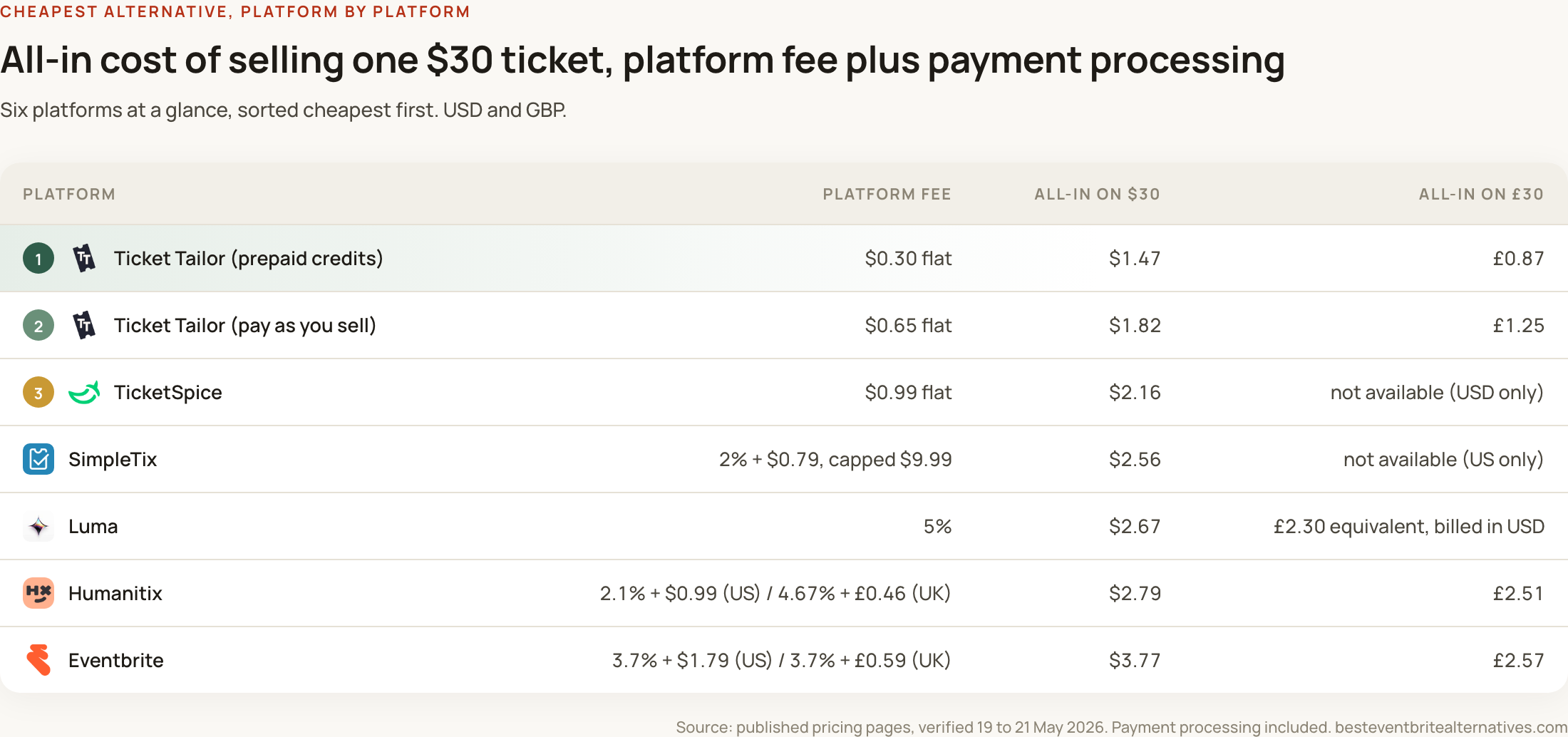
The two common structures are a percentage of the ticket price (sometimes with a small fixed component on top) or a flat fee per ticket regardless of price. The structure matters more than the headline number. Eventbrite’s 3.7% + $1.79 looks tidier on a pricing page than $0.85 per ticket, but on a $50 ticket the first costs $3.64 in platform fees and the second costs 85 cents. The percentage scales with whatever you charge. The flat fee does not.
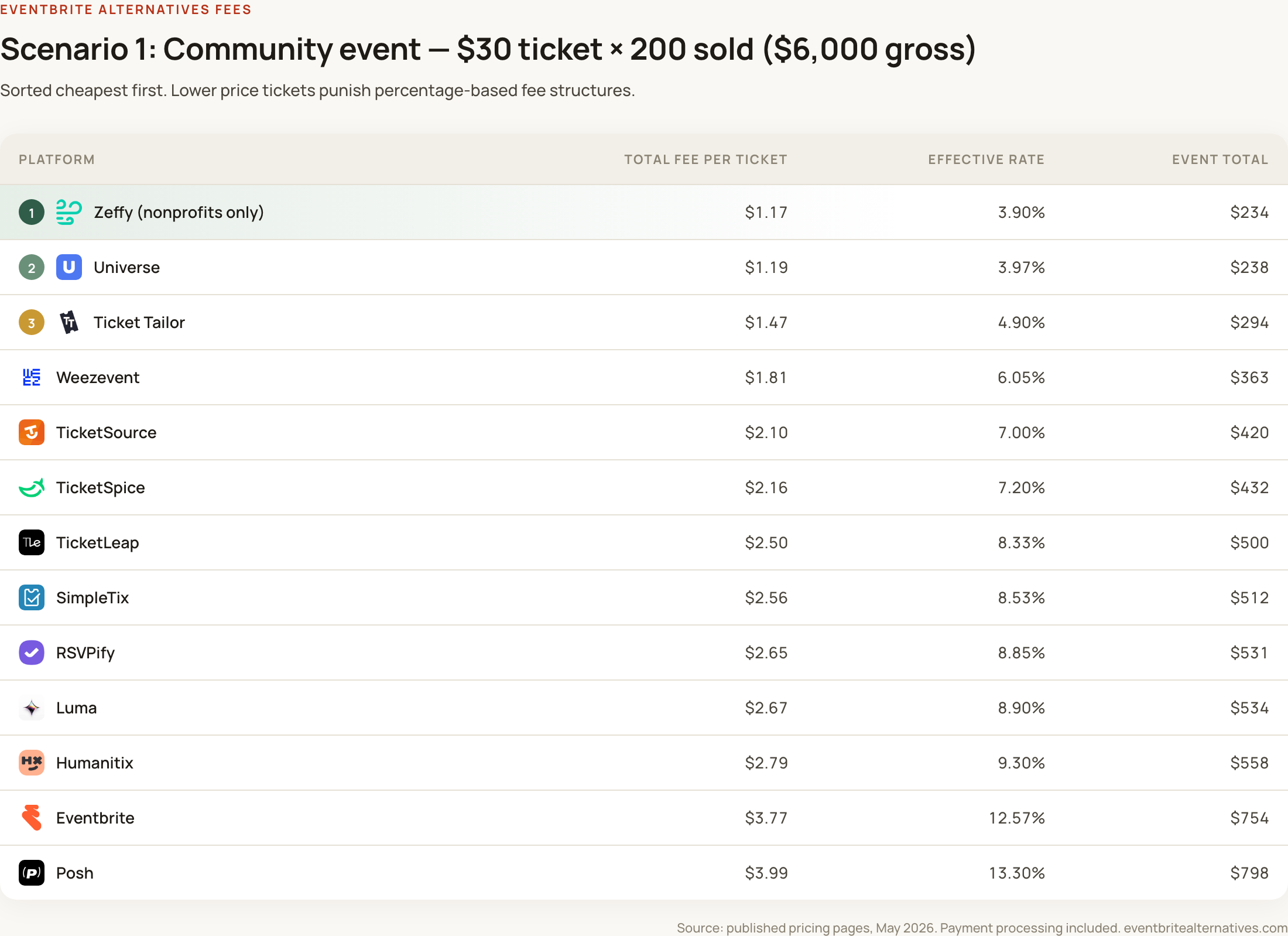
The thing to actually check: how does the fee behave at your average ticket price? A 3.7% rate on $20 tickets is one number. The same rate on $150 tickets is more than five times larger in absolute terms. A pricing page that only shows the percentage is leaving you to do that arithmetic.
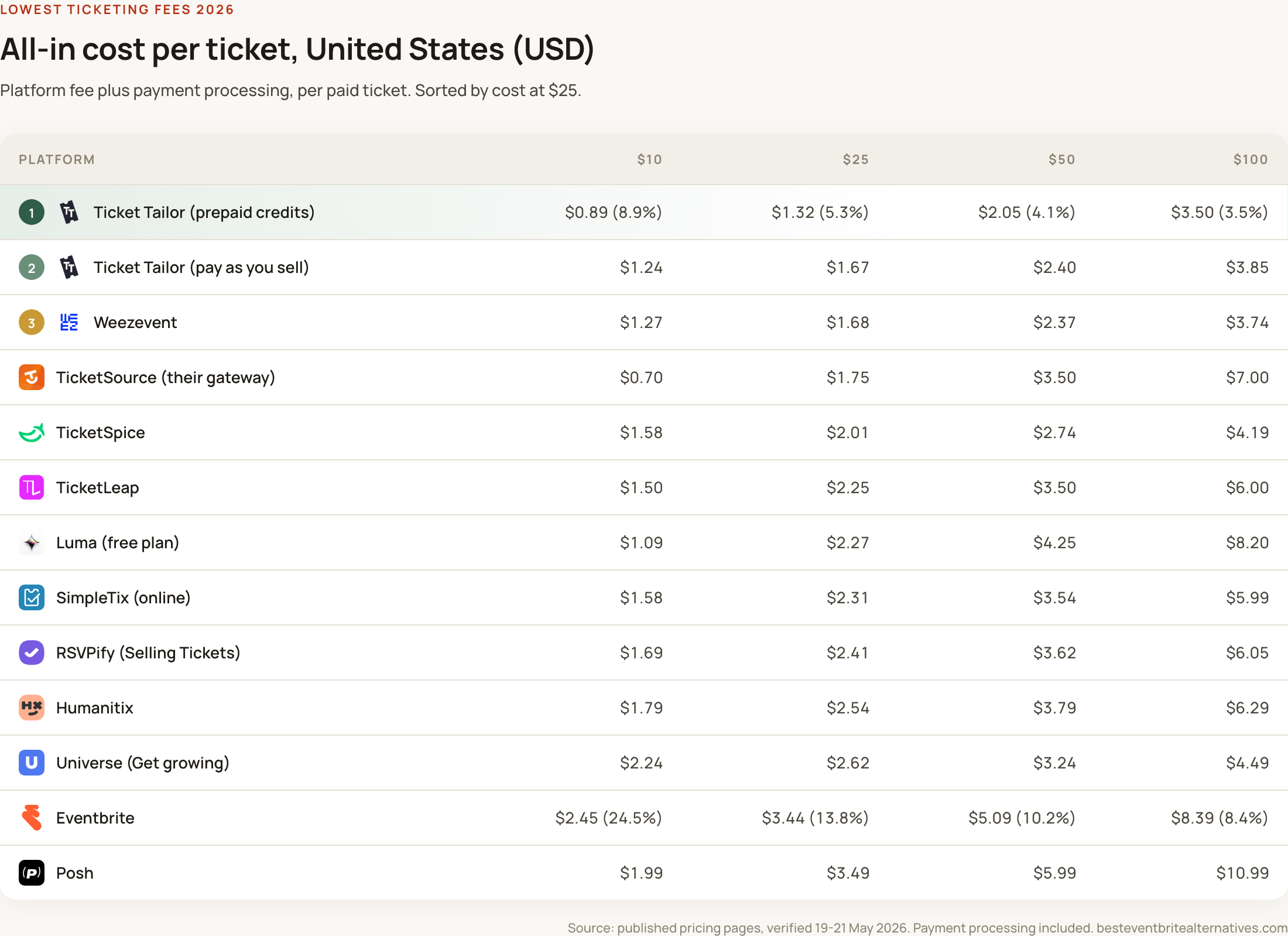
Platforms with the simplest fee structures (TicketSpice at $0.99 flat, Ticket Tailor from $0.30 per ticket on prepaid credits) let you work out the number in seconds. Platforms with percentage + fixed + processing + plan-tier structures require a spreadsheet. Neither is inherently dishonest, but the latter benefits from your willingness to skip the maths.
2. Payment processing
This is where the most legitimate confusion lives. Some platforms quote their ticketing fee and payment processing fee separately. Others bundle them into one combined rate. Both are valid approaches; comparing them is the hard part.
Eventbrite charges 3.7% + $1.79 as a service fee, then adds 2.9% as payment processing on top. Universe quotes a single combined rate of 5.5% + $0.99 with processing bundled in. TicketSource quotes 7% with everything included. These are all defensible structures, but reading them off three pricing pages and assuming they mean the same thing produces nonsense.
The thing to actually check: what does the platform charge in total, including payment processing, on a representative ticket? If a platform shows only the service fee with a small footnote about additional processing, the headline number is not telling you what you will pay. Run the maths with a fully-loaded figure or you will be comparing apples and apple cores.
Platforms that bundle processing into the headline rate (Universe, TicketSource, Weezevent) make this comparison easier in one direction and harder in another. The total is honest; the breakdown is opaque. Platforms that itemise (Eventbrite, Ticket Tailor, Humanitix) are more transparent about what each component costs but make cross-platform comparison harder unless you bring everything to the same denominator.
3. Feature gates and add-ons
This is where genuinely hidden costs live. The pricing page rarely tells you that a feature you assumed was included will, in fact, cost more.
The clearest current example is Luma’s email marketing. Luma’s headline platform fee on the default Free plan is 5%, which sits in the middle of the pack. What the pricing page mentions but does not emphasise is that newsletter sending is metered. The free tier allows 500 sends per week. Above that, Luma charges from $50 a month (for 10,000 sends weekly) up to $800 a month (for 100,000). The Plus subscription removes the 5% cut entirely but costs $69 a month, and even the Plus tier’s 5,000-sends-per-week limit will not cover most organisers running regular email campaigns to a meaningful list. Most ticketing platforms (Ticket Tailor, Eventbrite, Humanitix, TicketSource) include email at no extra charge, which means any comparison of Luma’s headline 5% needs to factor in either the metered email cost (on Free) or the subscription floor (on Plus). The worked example below shows how these shake out.
Other common feature gates worth checking before signing up:
- Tiered ticketing, presales and payment plans. Universe gates these behind its Standard plan, which moves organisers from the advertised Starter rate (2% + $0.59) to the rate most actually pay (5.5% + $0.99). The platform is transparent that this happens; it is just not what the headline number suggests.
- Custom branding and domains. Some platforms charge separately for removing their logo from your event page or running tickets on your own URL. Eventbrite Pro starts at $15 per month for additional marketing tools; deeper customisation lives in custom-quote Premium plans.
- On-site sales and box-office hardware. Most platforms include a mobile scanning app, but RFID, branded badges, custom paper tickets and dedicated on-site support are usually quote-only.
- API access and integrations. Standard integrations (Mailchimp, Zapier, Google Analytics) are generally free. Custom integrations and white-labelled embeds are sometimes gated to higher tiers.
The thing to actually check: write down the features you need before you read any pricing page. Then read each platform’s plan comparison table looking for them. If a feature you need sits on a higher tier, the headline rate is not your rate.
4. Operational fees you only discover when something goes wrong
These are the small print items that do not affect most events, but cost real money when they do.
- Refunds. Eventbrite’s service fees are non-refundable on cancelled events, meaning if you refund a ticket the platform keeps its cut. Most percentage-fee platforms work the same way. Some flat-fee platforms (Ticket Tailor, TicketSpice) refund their fee when the ticket is refunded; the policy is worth checking on a help-centre page rather than the pricing page.
- Chargebacks. Many platforms pass on chargeback fees from the underlying payment processor (typically $15 to $25 per dispute, regardless of outcome) directly to the organiser. Universe includes standard chargeback support across all plans, with extended support gated to Pro; Stripe-based platforms typically pass the processor’s fee through unchanged.
- Currency conversion. Selling tickets internationally usually means paying a foreign exchange margin on top of the processor’s rate, typically 1 to 2%. This rarely appears on a pricing page.
- Payout fees. Some platforms charge a fee for early or instant payouts. Most include standard payouts (typically five to seven days post-event for marketplace platforms, or as-tickets-sell for direct-to-organiser platforms) at no charge.
The thing to actually check: read the platform’s help centre for “refunds”, “chargebacks” and “payouts”. These three pages tell you more about the real cost of an event going wrong than any pricing page will.
5. Subscription floors and plan minimums
A small but growing category. Several ticketing platforms now operate on a freemium model where the core ticketing is technically free, but the features that make it usable for anything more than a hobby event are gated to a paid plan.
RSVPify’s Free plan is restricted to 100 registrations a month, one active event at a time, and an ad-supported guest view. The paid tier you actually need (Starter) is $39 a month. Eventbrite Pro starts at $15 a month for additional email volume and marketing tools, scaling to $100 a month. Luma Plus is $69 a month (or $59 if billed annually), and primarily exists to remove the platform’s 5% cut on paid events.
The thing to actually check: read the plan comparison table, not the headline pricing. If the features you need require a paid subscription, the “free for small events” framing is doing more work than it should.
A worked example: the two faces of Luma’s pricing
Luma is a useful case study because its pricing has two genuinely different shapes, and which one saves you money depends almost entirely on how often you run events. Consider a small festival selling 500 tickets at $40 each, organised by a team that wants to email a 5,000-person list four times before doors open over a two-month campaign.
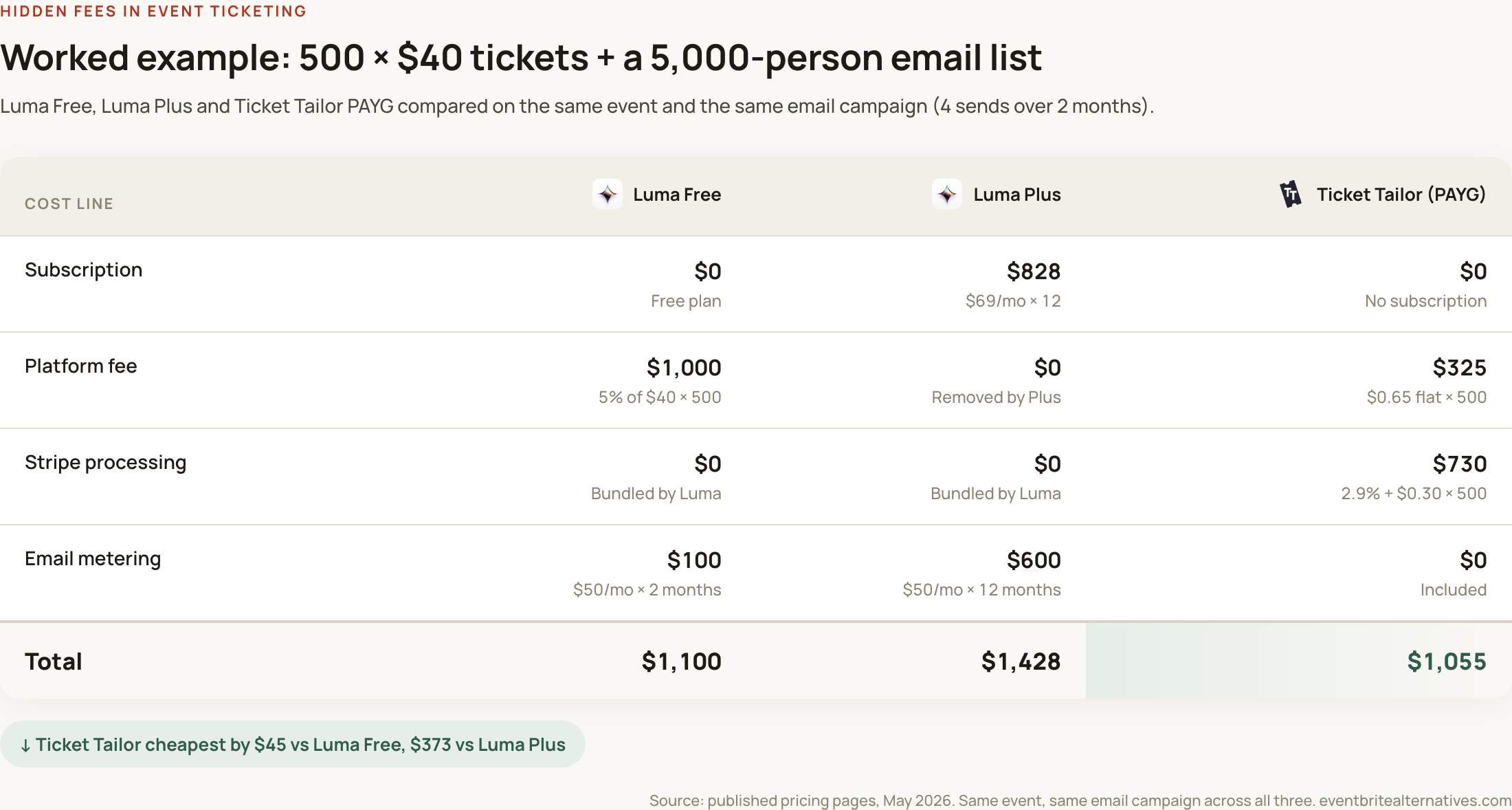
The numbers tell a story that runs against the headline marketing on every platform involved. Luma Free, despite the 5% cut, comes out within $45 of Ticket Tailor because Luma absorbs Stripe processing into the platform fee rather than charging it separately. Ticket Tailor itemises Stripe, which makes the comparison look worse than it is until the numbers are properly stacked. The two platforms are within rounding distance of each other for a single event.
Luma Plus, on the other hand, is the most expensive option of the three for this scenario, despite being marketed as the upgrade that removes platform fees. The subscription cost and the email metering add up to more than the platform cut saved. The Plus subscription only earns its keep if the organiser runs multiple events across the year, spreading $828 across enough revenue to offset the foregone 5% on each one. For a one-event-a-year team, paying for Plus is a worse deal than paying the 5%.
This is the structural shape of the hidden-fees problem. The fees are not really hidden. They are conditional. The conditions appear on the pricing page but only become real once you have decided which tier to use, which features to need, how often you plan to email your list, and how many events the subscription needs to cover before it pays for itself. None of that information lives on the headline rate.
A short checklist before signing up
Five questions to answer before you commit to a platform:
- 1. What is my average ticket price, and how many tickets will I sell? Run the maths on three platforms using both their service fee and payment processing. Use a representative number, not the platform’s own example. Try our calculator.
- 2. Which features do I actually need? Write the list before reading any plan comparison tables. Tiered ticketing, presales, payment plans, custom branding, email marketing, reserved seating, multi-currency, on-site box-office. If a needed feature is gated to a higher tier, that is your real rate.
- 3. What is my email volume? If you run any serious campaign, email cost is a meaningful line item that platforms like Luma surface separately. Most other platforms include it.
- 4. What happens if I have to refund or cancel? Read the refund policy on the help centre, not the pricing page. A non-refundable service fee on a cancelled event is a cost you only discover when it is too late to switch.
- 5. What currencies, regions and payment methods do I need to support? International events incur conversion margins; some platforms support specific local payment methods (iDEAL, Bancontact, Pix) while others are card-only.
A few questions worth asking any sales rep
Pricing pages are designed to look favourable. Sales conversations are where the real numbers come out. If you are speaking to a rep, three questions tend to surface the genuine total cost faster than any other:
- “What does an organiser like me actually pay on average, including processing, after a typical year of use?”
- “Which features on my list are included in the plan you have quoted me, and which require an upgrade?”
- “What costs would you flag that are not on the pricing page?”
A platform that answers all three plainly is usually one worth shortlisting. A platform that does not is telling you something useful about itself.
The honest summary is that ticketing fees are not hidden in any deceptive sense. They are just spread across more places than most pricing pages bother to consolidate. Working through the five categories above takes half an hour and almost always changes the shortlist.